Hyper-V Server
UPDATED April 2024
Most applications work perfectly fine when set up in the Fresh Start machine using DaDesktop (DD). However, one or two applications may not function as expected due to the cloning process and require a few additional steps to get them running smoothly.
System Details
- Hyper-V Server 2019 and above (other versions will probably show same behaviour)
- Installed using the Windows 10 / Win 2019 Server template
Fresh Start Fix Notes
-
Please note this is a general guide for fixing this application when working within Fresh Start. Steps might differ based on your precise setup configuration.
-
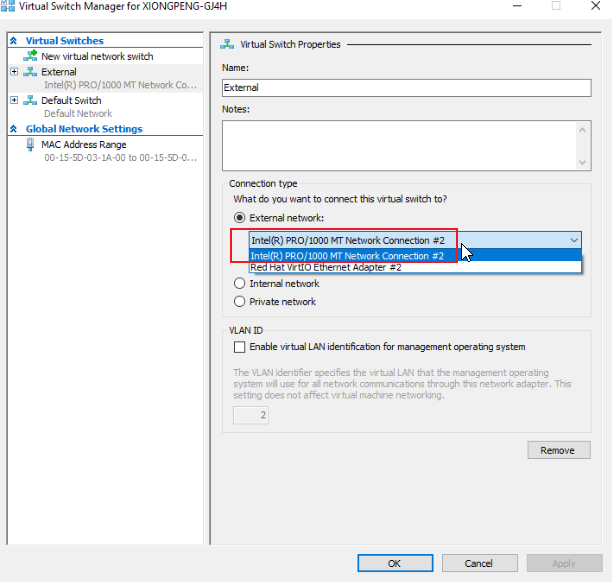
Summary - Fix on Fresh Start as below. Hyper-V has an issue with duplicate MAC addresses on the External switch when cloned from the FreshStart machine, so we choose the second pre-configured Intel network connection or remove the external switch in the FreshStart machine before cloning, which is what I explain in detail below.
Fix process
1. Below shows the Hyper-V Manager application. Right-click to select the Virtual Switch Manager dialog box.
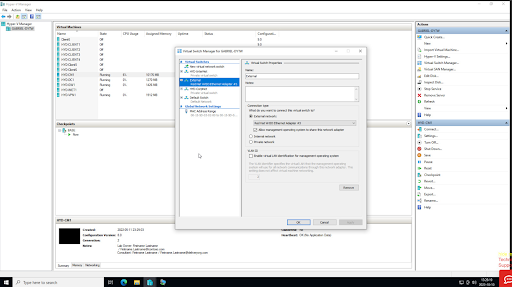
2. On the Virtual Switch Manager dialog box as below, select the 'External' switch as shown, select the Intel Pro /1000 network connection as above. NB This option is only available when using newer Windows 10 templates, v71 and higher. Press OK, and save the config if needed. Close the Hyper-V manager application.
3. Continue with FreshStart machine configuration as required. Once the configuration is complete, shut down the machine from inside the VM, waiting until the machine is fully powered off. Then Clone the FreshStart machine to the Trainer and Participant's machines as required.
The Hyper-V server should now operate correctly on the Trainers and Participants' machines. Without this modification, participants may see each other's machines instead of their own because the external network card is cloned, creating duplicate MAC addresses on the External switch when cloned from the FreshStart machine.
Please reach out to DaDesktop Support via the chat app if you continue to experience issues. We will be happy to assist.